
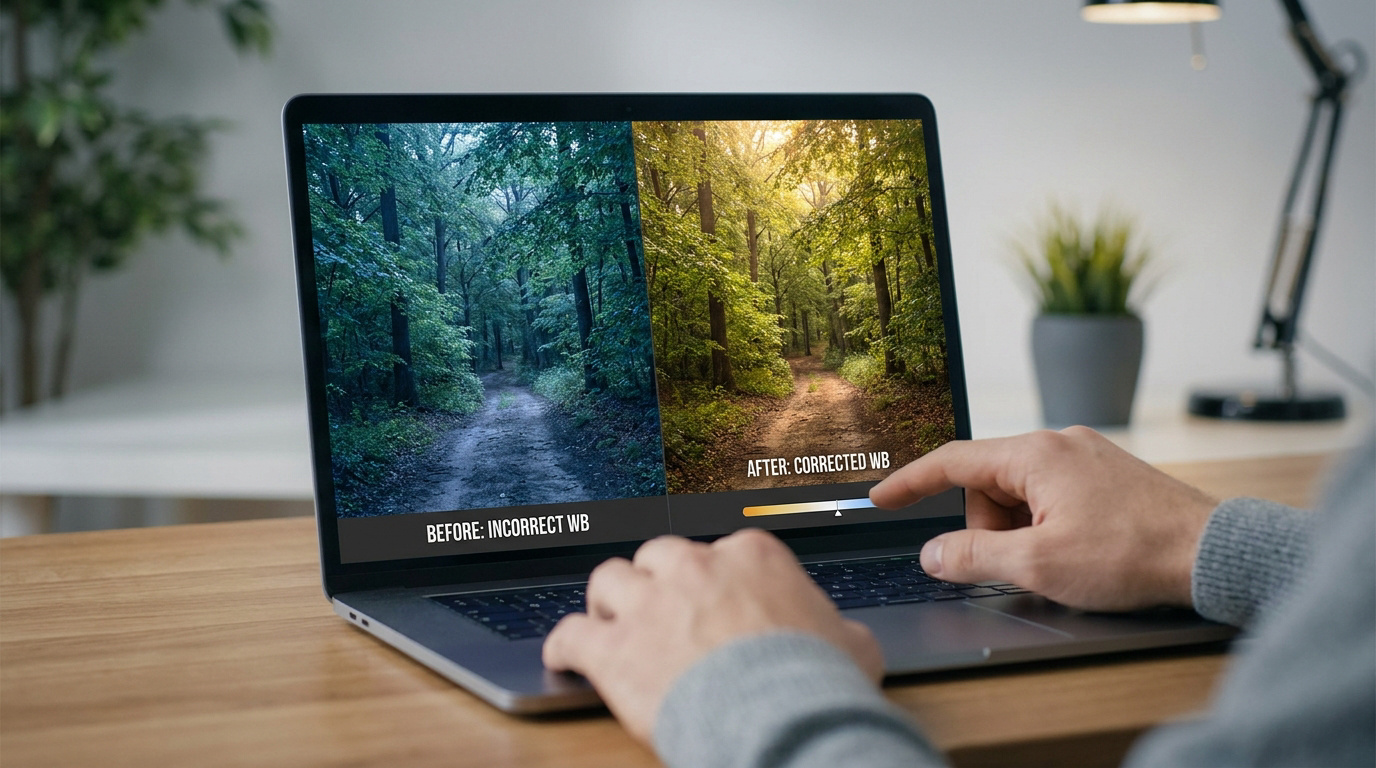
Key takeaway: White balance neutralizes color casts by matching sensors to light temperatures, measured in Kelvin. While the brain adapts instantly, cameras require calibration to avoid unnatural orange or blue tints. Mastering this process, especially using RAW files for post-processing flexibility, ensures color accuracy across diverse light sources ranging from 2000K candlelight to 10000K clear skies.
The human brain automatically filters light to keep colors consistent, yet your digital sensor records every wavelength literally. Why do your indoor photos often end up with a muddy orange tint that ruins skin tones despite the high quality of your gear?
Understanding what is white balance in photography and how the Kelvin scale works allows you to neutralize these distracting color casts. We will explore how to calibrate your camera for perfect accuracy or use temperature creatively to change the mood of your images.
- What Is White Balance and How It Fixes Color Casts
- Kelvin Scale and the Science of Color Temperature
- Does Auto White Balance Work for Every Situation?
- Post-Processing Strategies for Perfect Color Results
What Is White Balance and How It Fixes Color Casts
White balance neutralizes color casts by matching camera sensors to light temperature, measured in Kelvin. While human brains adapt instantly to shifts, digital sensors require manual or algorithmic calibration to define true white.
The way our minds handle light is actually quite different from how a piece of glass and silicon does it.
Human Vision Versus Digital Sensor Interpretation
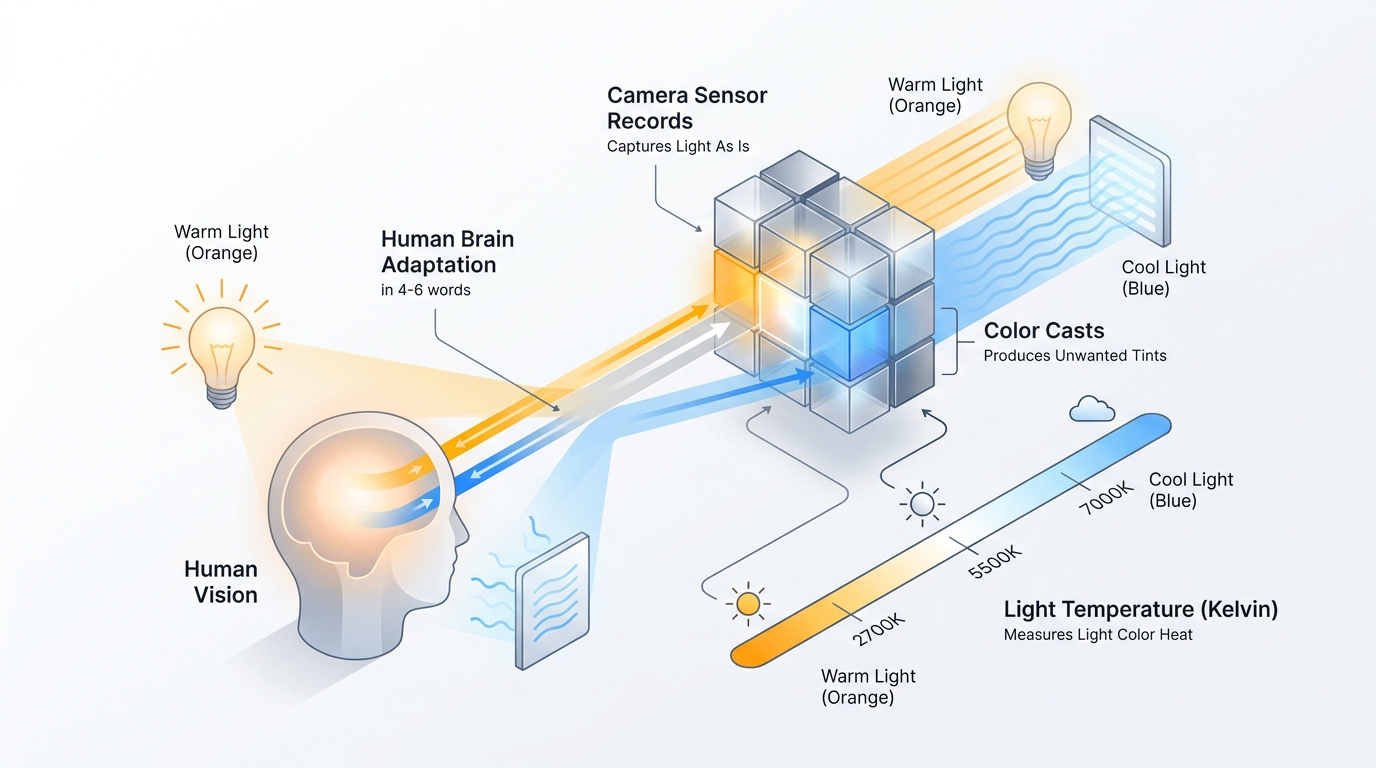
Human eyes excel at chromatic adaptation. Our brain filters ambient light automatically. We perceive a white sheet as neutral regardless of the specific lighting environment surrounding us.
Digital sensors function very differently. Cameras record light literally without any biological bias. They lack the cognitive ability to adjust for ambient color shifts in a natural way.
This results in distinct color casts. Sensors capture the exact wavelength of the light source. Without correction, photos appear with heavy blue or orange tints. This discrepancy defines the need for white balance settings.
But why does this technical gap turn your cozy living room shots into an orange mess?
Why Your Indoor Photos Look Yellow or Orange
Tungsten and incandescent bulbs are the usual culprits. These sources emit a very low color temperature, often around 3000 K. The light physically leans toward the warm end of the spectrum.
The camera reacts poorly to this warmth. The sensor records the heavy orange output of indoor lamps. This creates a muddy, unnatural look in skin tones that ruins the shot.
Most beginners struggle with these warm shifts in living rooms. It is a common frustration. Proper calibration tells the camera to add blue. This counteracts the orange to achieve a neutral result.
Kelvin Scale and the Science of Color Temperature
Understanding why light shifts requires a look at the mathematical side of color, specifically the Kelvin scale.
Warm Versus Cool Light Across Different Sources
The Kelvin scale defines how we measure light appearance. Candlelight sits low at about 2000K. Direct sunlight reaches roughly 5500K. A clear blue sky can soar above 10000K. These numbers dictate the visual temperature.
Compare 3000K and 7000K. The lower number produces deep amber tones. The higher number creates a clinical blue atmosphere. Light behaves differently at these specific points.
There is an inverse relationship here. Photographers must add the opposite color to balance the frame. Cooling a 3000K shot requires significant digital adjustment.
Balancing the Green and Magenta Tint Spectrum
Introduce the secondary tint axis. Light isn’t just blue or yellow. It also shifts between green and magenta levels. This axis is often overlooked by novices.
Discuss problematic light sources. Fluorescent tubes often cast a sickly green hue. Cheap LED panels can lean heavily toward magenta. These shifts require a specific type of correction. Most modern cameras include a tint slider.
Explain the correction process. You must push the slider toward magenta to fix green. This creates a balanced, professional color profile.
Does Auto White Balance Work for Every Situation?
While the science is clear, relying on the camera’s internal logic is not always the best move for accuracy.
Common Scenarios Where Automatic Settings Fail
Identify dominant color subjects. A large red wall confuses the camera. The algorithm assumes the red is a color cast. It then tries to “correct” it.
Explain the monochromatic scene failure. Snow or deep forests trick Auto White Balance (AWB). The camera attempts to make everything neutral gray. This ruins the natural atmosphere.
Detail the result of these errors. Your photos end up looking dull or strangely tinted. AWB is a guess, not a guarantee. It often fails in mixed lighting or high-contrast environments.
Manual Presets and Custom Gray Card Calibration
Explain the logic behind presets. “Cloudy” adds warmth to cool light. “Shade” adds even more to combat blue shadows. “Tungsten” adds blue to fix orange bulbs. These are reliable shortcuts for most users.
Detail the custom gray card process. Place a neutral reference in the scene. Tell the camera that this object is gray. The sensor then calibrates perfectly.
Emphasize the precision of manual control. This method ensures 100% color accuracy. It is the gold standard for professional studio work. Knowing What Is White Balance in Photography and Why It Changes Everything starts with taking back control from the machine.
Post-Processing Strategies for Perfect Color Results
If the shot is already taken, the battle for perfect color moves from the lens to the computer screen.
RAW Versus JPEG Flexibility for Color Correction
JPEGs bake the white balance into the pixels. This makes significant changes destructive to quality. The data is effectively lost forever.
Explain the RAW workflow advantage. RAW files store white balance as metadata. You can change the Kelvin setting later without losing detail. It acts as a vital safety net for every photographer.
AI-Powered Editing Tools for Mixed Light Scenarios
Modern software has evolved. AI can now identify different light sources in one frame. It applies local corrections to balance a window and a lamp. This was nearly impossible years ago.
The speed of 2026 tools is impressive. One click often fixes complex mixed lighting issues. Modern algorithms handle the heavy lifting for busy editors.
Creative Color Shifts to Evoke Specific Moods
Artistic white balance is a choice. You don’t always need “correct” colors. Sometimes, the “wrong” setting creates a better story. Intentional shifts are a powerful creative tool.
Emotional tones differ greatly. Cool blue tones evoke distance or sadness. Warm golden tones suggest intimacy and comfort. Choose the temperature that fits your narrative goals.
Experiment freely. Color is subjective. Break the rules for impact.
Mastering white balance ensures color accuracy by neutralizing Kelvin shifts and correcting green-magenta tints. Apply these manual calibrations or RAW adjustments now to eliminate muddy tones and reclaim professional realism. Your future shots will finally reflect the true beauty of the world you capture.
FAQ
What exactly is white balance in digital photography?
White balance is a critical calibration process used to neutralize unwanted color casts in your images. Its primary goal is to ensure that colors appear exactly as they do in real life, making sure that objects which are white to the human eye are rendered as true white in the final digital file.
While our brains naturally adapt to different lighting through chromatic adaptation, digital sensors record light wavelengths literally. By adjusting the white balance, you compensate for the specific color temperature of your light source to achieve natural skin tones and accurate environmental colors.
How does color temperature affect the look of my photos?
Color temperature, measured on the Kelvin (K) scale, dictates whether your light appears “warm” or “cool.” Lower values, such as 2000K to 3000K, produce a warm, yellowish glow typical of candlelight or sunsets. Conversely, higher values above 6000K result in a cool, blue-tinted light often found under cloudy skies or in deep shade.
Understanding this scale allows you to counteract the physical properties of light. If you are shooting under orange-toned indoor bulbs, you must tell your camera to add blue to reach a neutral 5000K “daylight” balance, preventing your shadows from looking muddy or unnatural.
When should I avoid using Auto White Balance (AWB)?
Auto White Balance is highly convenient but can be easily tricked by scenes dominated by a single color. For example, if you are photographing a subject against a large red wall or a lush green forest, the camera’s algorithm may misinterpret the dominant color as a “cast” and try to neutralize it, resulting in dull and incorrectly tinted images.
AWB also struggles in mixed lighting environments where multiple light sources, such as a window and a lamp, compete. In these scenarios, using manual presets like “Cloudy” or “Tungsten,” or calibrating with a custom gray card, provides much higher precision than relying on the camera’s internal logic.
What are the benefits of fixing white balance during post-processing?
Adjusting color in post-processing offers a vital safety net, especially when shooting in RAW format. Unlike JPEGs, which bake color settings into the pixels permanently, RAW files store white balance as metadata. This allows you to change the Kelvin setting or tint later without any loss in image quality or detail.
Modern editing software also utilizes AI-powered tools to handle complex lighting. These tools can identify and balance different light sources within a single frame, such as correcting the green hue from fluorescent tubes while maintaining the warmth of a nearby desk lamp, a task that was once incredibly difficult for photographers.
Can I use white balance settings for creative effects?
Absolutely. You don’t always have to aim for “perfect” or neutral colors; white balance is also a powerful creative tool for storytelling. By intentionally shifting toward warmer tones, you can evoke feelings of intimacy and comfort, while cooler blue tones can create a sense of distance, sadness, or clinical precision.
Since color is subjective, experimenting with “incorrect” settings can often result in a more impactful narrative. Professional photographers frequently break the rules of technical accuracy to enhance the emotional atmosphere of their work.