
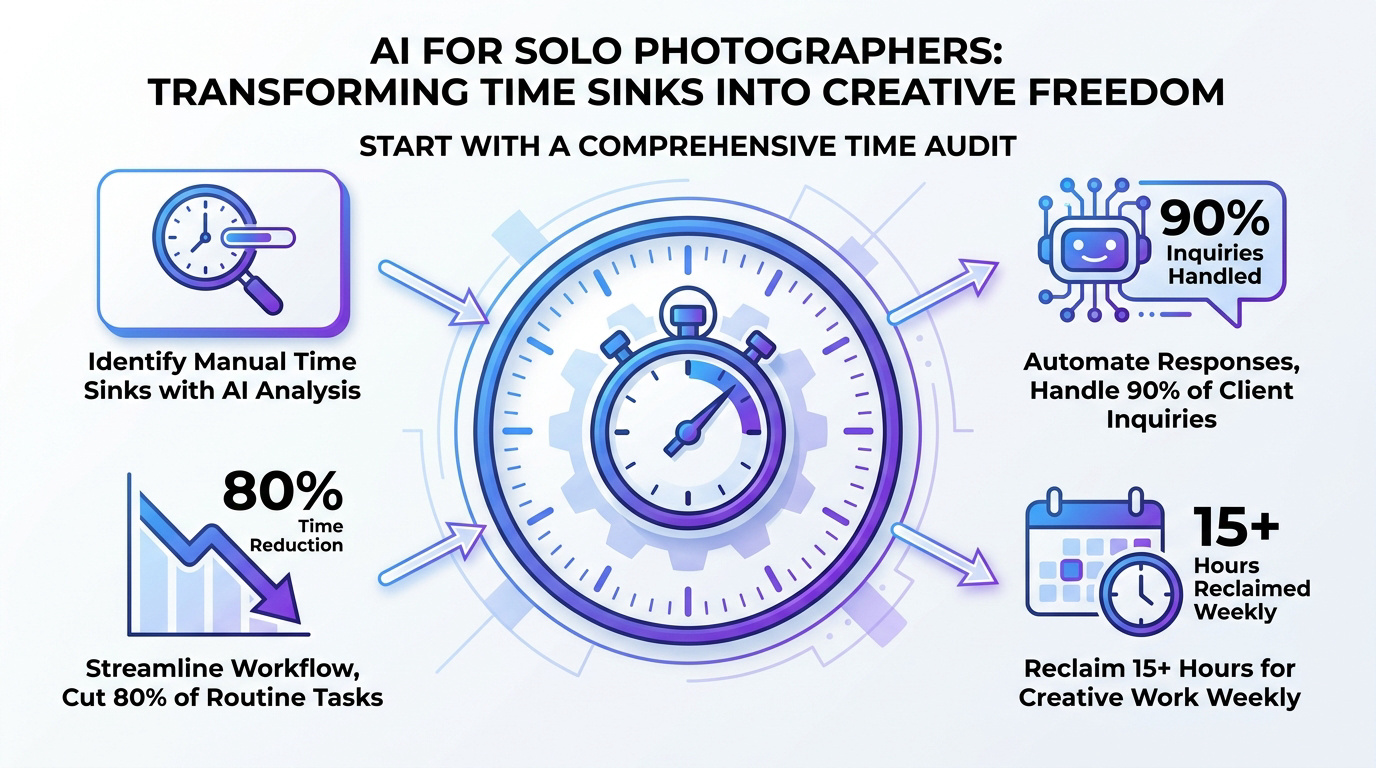
Key takeaway: Solo photographers can reclaim over 15 hours weekly by adopting a hybrid AI workflow. Automated culling reduces sorting time by 80%, while AI-driven CRMs handle 90% of initial inquiries. By delegating repetitive editing and administrative tasks to intelligent tools, professionals protect their creative energy and focus on high-value strategic growth without losing their unique artistic signature.
Professional photo editing software can now reduce post-production time by up to 70% through automated workflows. Yet, many solo photographers still find themselves trapped in a cycle of manual culling and administrative tasks that drain their creative energy.
This guide explains how to integrate AI-assisted operations to reclaim your schedule and focus on the art of photography. We will explore the specific tools and strategies needed to automate your business without losing your unique artistic touch.
- AI for Solo Photographers Starts With a Brutal Time Audit
- Training Models to Replicate Your Unique Editing Style
- 3 Ways to Automate Client Communication and CRMs
- Why a Hybrid Workflow Protects Your Creative Soul
AI for Solo Photographers Starts With a Brutal Time Audit
Automated culling reduces sorting time by 80%, while AI-driven CRMs handle 90% of initial client inquiries. Hybrid workflows reclaim 15+ hours weekly by automating noise reduction and administrative scheduling, starting with a rigorous audit of manual time sinks.
Transitioning from chaos to control requires a clear-eyed look at your current manual time sinks.
Identifying Where Your Hours Vanish
Track every daily task to expose hidden time drains. Distinguish between high-value creative shooting and low-value administrative drag. Be honest about your distractions.
Calculate the actual financial cost of manual labor. Every hour spent sorting files is money lost. Use a simple spreadsheet to log your activities for one week. This data reveals exactly where automation is needed most to save your business.
Compare your creative output against time spent on emails. The results usually shock solo professionals into immediate action.
Automating the Culling Process With Smart Selection
Machine learning filters images by sharpness and facial expressions instantly. Set specific parameters for automated ranking during high-volume shoots. Stop looking at every blurry frame manually.
Automated selection reduces the heavy psychological fatigue of sorting thousands of frames. Let the software highlight the best shots based on technical data. You remain the final judge of art.
Spend your energy on the top 10% of your work. Trust the algorithm to handle the initial cull.
Speed is the goal here. Efficiency creates room for better creative choices later.
Training Models to Replicate Your Unique Editing Style
Once the audit identifies the waste, the real work begins by teaching software how to mimic your specific artistic touch.
AI-driven Retouching and Noise Reduction Techniques
Refine color and exposure through automated batch processing tools. Apply advanced noise reduction to high-ISO files without losing detail. Modern plugins handle these technical tasks with incredible precision.
Basic skin retouching no longer requires tedious manual brush strokes. Smart algorithms identify skin texture and smooth it naturally. This saves hours on every portrait session you deliver.
Batch processing is your best friend. Quality remains high while effort drops significantly.
Mastering AI Masking for Targeted Background Adjustments
Isolate subjects from backgrounds with precise masking tools in seconds. Adjust environment lighting using intelligent depth maps for a professional look. Complex selections used to take minutes per photo. Now, they happen with a single click in your software.
Targeted adjustments give your images a three-dimensional quality. The AI understands the difference between sky and subject.
Use these masks for dramatic lighting. The precision is better than manual work.
Balancing Speed With the Human Creative Eye
Maintain a human eye for the final creative decisions on every project. Avoid the generic look of over-processed automated images by checking results. You are still the lead artist.
Keep artistic control while increasing your overall output speed. Use automation for the heavy lifting but tweak the final mood yourself. Technology serves your vision, not the other way.
Trust your gut on the final edit. AI provides the base; you provide soul.
3 Ways to Automate Client Communication and CRMs
Beyond the pixels, your business survives on communication, which is where administrative automation truly shines.
Smart Email Drafting and Proposal Generation
Draft emails and proposals using predictive text models to save time. Customize these templates to maintain your unique personal brand voice. Don’t let your inbox become a graveyard.
Manage project notes through automated transcription tools during client calls. This ensures you never miss a critical detail or request. Clear communication builds trust and leads to repeat business.
Proposals should be sent within minutes. Speed shows professionalism and secures bookings.
Integrating AI Meeting Assistants and Project Notes
Sync client inquiries with automated scheduling tools to avoid double bookings. Set up triggers for payment reminders and contract signing automatically. Stop chasing clients for basic administrative tasks.
Use chatbots to handle basic logistical questions on your website. They provide instant answers while you are out shooting. This keeps potential leads engaged without your constant manual input.
Automation works while you sleep. Your business stays active twenty-four hours a day.
Maintaining Brand Voice in Automated Communications
Verify that every automated message sounds authentic and human to your clients. Establish clear guidelines for AI-generated responses to protect your reputation. Review automated drafts regularly to prevent robotic or cold interactions. A personal touch is your greatest competitive advantage.
Clients should feel heard, not processed. Use automation to start the conversation, then step in personally.
Consistency is key for branding. Make sure the AI speaks your language.
Why a Hybrid Workflow Protects Your Creative Soul
Efficiency is vital, but protecting your artistic spark requires knowing when to turn the machines off.
Defining the No-AI Zones for Personal Growth
Set strict boundaries for personal creative projects without any automation. Protect your artistic skills from stagnation through regular manual practice. Experiment with new visual techniques by hand to grow.
Personal work keeps your technical knowledge sharp and relevant. Don’t let software make every decision for you. The joy of photography often lies in the slow, manual process of creation.
Manual editing is a form of meditation. Keep it for your private projects.
Addressing Data Privacy and Image Ownership Concerns
Review data privacy terms for all cloud-based processing services you use. Protect your image ownership when uploading files to third-party AI models. Establish clear boundaries for how client data is used in these systems. Your reputation depends on digital security.
Read the fine print before clicking accept. Know where your data is stored and who sees it.
Privacy is a professional obligation. Treat your client’s data with extreme care.
Choosing the Right Tools for Your Specific Niche
Compare tool features based on your specific photography genre and needs. Evaluate the actual cost versus time saved for different software options. Don’t buy every new shiny tool.
Test trial versions to check for workflow compatibility before committing. Ensure the software fits your existing style and habits.
The best tool is the one you actually use. Focus on ROI for every subscription.
By integrating automated culling, batch editing, and smart CRM workflows, you reclaim 15+ hours weekly to focus on your creative vision. Audit your manual tasks today to implement these AI-assisted operations before administrative drag stifles your growth. Master this hybrid balance to scale your business while preserving your unique artistic soul.
FAQ
How can I use AI to speed up the process of sorting through my photos?
You can significantly reduce the time spent on manual sorting by using machine learning tools that analyze thousands of images instantly. These systems identify the best shots based on technical parameters like sharpness, exposure, and facial expressions, allowing you to reject blurry frames or closed eyes without viewing every single file.
By automating the initial cull, you reduce psychological fatigue and can focus your creative energy on the top 10% of your work. Software like Imagen AI or Evoto acts as a smart assistant, highlighting the best technical takes while you remain the final judge of the artistic value.
Can AI really replicate my specific photo editing style?
Yes, modern AI tools can learn your unique aesthetic by analyzing your previous Lightroom catalogs. Once the model understands your preferences for color, contrast, and light, it can apply those specific adjustments to new sets of images, ensuring visual consistency across an entire session in seconds.
This hybrid approach allows you to handle heavy lifting, like noise reduction and basic skin retouching, through automation while you step in for the final creative tweaks. It maintains your professional “soul” in the work while cutting down editing time by up to 96%.
What are the best ways to automate my client communications and administrative tasks?
Solo photographers can reclaim hours by integrating AI-driven CRMs that handle initial inquiries, draft proposals using predictive text, and send automated payment reminders. You can also deploy chatbots on your website to answer common logistical questions, keeping leads engaged even while you are out on a shoot.
Additionally, using automated transcription tools during client calls ensures you never miss critical project details. These systems work twenty-four hours a day, allowing your business to stay active and professional without requiring your constant manual input for every email.
How do I protect my image ownership and data privacy when using AI tools?
It is crucial to review the data privacy terms of any cloud-based AI service to understand how your files are being used. You should establish clear boundaries regarding whether your images are used to train third-party models, often by utilizing “opt-out” options in your metadata or account settings.
Protecting your reputation means treating client data with extreme care. Always check for “Content Credentials” or similar transparency tools that certify the source and history of your digital assets, ensuring that your rights as a creator remain intact in an automated workflow.
Is it possible to maintain a personal brand voice while using automated emails?
To keep your brand authentic, you must customize AI-generated templates to match your specific tone and vocabulary. Automation should be used to start the conversation or handle routine logistics, but you should regularly review drafts to ensure they don’t sound robotic or cold to your clients.
A personal touch is a solo photographer’s greatest competitive advantage. Use the time saved by automation to engage more deeply with clients during the creative phases of a project, ensuring they feel heard and valued rather than just “processed” by a system.